For everyone who pastes work into AI
Use AI without leakingpersonal data.
You paste a record into an AI chat to get help, and the ID numbers go with it. Gel warns you before personal data reaches the chat and offers a redacted copy to paste. For files, it saves a copy with the personal data blacked out. It all runs on your Mac.
Demo build · 14.4 MB · macOS 15+ · Apple silicon
AI chat · Chrome
Can you summarize this employee record for me?
Gel caught a leak · Chrome
This would leak: 4 government ID numbers, 1 salary, 1 bank account, 1 address, 1 birth date, 2 contact details, 2 names
Leak Guard, recreated: a synthetic employee record was just copied. The list is Gel's real output for that sample.
Runs on your Mac with
- Ollama
- Qwen3 4B
- BGE-M3
- Apple Vision
- NaturalLanguage
- SQLite FTS5
The research
Most leaks into AI aren't malicious. They're copy and paste.
Cyberhaven Labs tracked billions of data movements into AI tools at 222 companies for its 2026 AI Adoption & Risk Report. People paste records into a chat to get everyday work done, and the personal data goes with them.
“AI-related threats are almost always unintentional.”
39.7%
of all AI interactions involve sensitive data, counting prompts, copy-paste and file uploads.[1]
3 days
is how often, on average, an employee puts sensitive data into an AI tool.[2]
32.3%
of ChatGPT use happens through personal accounts, outside company accounts. For Claude it's 58.2%, for Perplexity 60.9%.[2]
82%
of the 100 most-used AI apps are rated medium, high or critical risk.[1]
Gel sits at that moment: the paste and the upload. It catches personal data on your clipboard before it reaches an AI chat, and blacks it out of files before you share them.
What Gel does.
Caught before you paste.
Copy something with ID numbers or bank details in it and switch to an AI chat in your browser: Gel warns you what it holds and offers a copy with placeholders like [SSS_1] to paste instead.
Finds the personal data for you.
Government IDs (SSS, TIN, PhilHealth, Pag-IBIG, PhilSys), passports and driver's licenses, card, bank and GCash numbers, salaries, phone numbers, addresses and names, in text PDFs, scanned pages and photos. Patterns, Apple's name detection and a local AI model each take a pass.
Blacked out for good, before you upload.
Need to give an AI or a client the file itself? The redacted copy is rebuilt from page images with the boxes flattened in, so the blacked-out text can't be selected, searched or copied back out. Your original stays exactly as it was.
For anyone who asks AI for help with real documents.
Work: HR and admin teams
The example on this pageRésumés, 201 files and payslips carry SSS, TIN and PhilHealth numbers and salaries. Black them out before the files go to a client, a vendor or an AI chat.
Personal: your own documents
Passports, driver's licenses, bank statements and GCash details. Keep the numbers out of an AI chat, or black them out before you send a loan, rental or job application.
How it works
Uploading the file itself? Send a redacted copy.
Gel will black out 16 of 16 items in 1 file.
Untick anything you want to keep visible. Your original files are never changed; redacted copies are saved to a Redacted folder.
Before · your original, unchanged
KRISTINE JOY MANALO REYES
Payroll Specialist
101 Sampaguita St., Brgy. Dela Paz, Antipolo City, Rizal 1870
0966 174 4548 · kristine.reyes@sulat.example
Date of birth: April 18, 1991
Government IDs
SSS 25-6708763-7 TIN 320-398-458-000
PhilHealth 03-376137895-6 Pag-IBIG 1861-6116-9066
Expected salary: ₱45,000.00
Experience
After · exactly what the saved copy will look like
KRISTINE JOY MANALO REYES
Payroll Specialist
101 Sampaguita St., Brgy. Dela Paz, Antipolo City, Rizal 1870
0966 174 4548 · kristine.reyes@sulat.example
Date of birth: April 18, 1991
Government IDs
SSS 25-6708763-7 TIN 320-398-458-000
PhilHealth 03-376137895-6 Pag-IBIG 1861-6116-9066
Expected salary: ₱45,000.00
Experience
Page 1 of 2 · Resume_REYES.pdf
Black out 16 items · Save 1 copyGel's review screen, recreated with a synthetic résumé from the sample files.
01
Select the files
In Gel's Library, select one file or several and click Redact. Gel checks every page on your Mac, scans included.
Library · HR Files / Resumes
- Resume_REYES.pdf
- Santos_Rodel_Resume.pdf
- CV - Patricia Anne Cruz.pdf
- CV - Rommel Valdez.pdf
Redact 3 files02
Review Before and After
Each page shows side by side: your original with every finding outlined, and exactly what the saved copy will look like. Untick anything you want to keep visible.
Gel will black out 15 of 16 items in 1 file.
- 25-6708763-7SSS
- 0966 174 4548Phonekept
- ₱45,000.00Salary
- April 18, 1991Birth date
03
Save the redacted copies
Gel saves a new file for each one in a Redacted folder next to the originals. Originals are never changed, and an earlier copy is never overwritten.
HR Files / Resumes / Redacted
- Resume_REYES_REDACTED.pdf
- Santos_Rodel_Resume_REDACTED.pdf
- CV - Patricia Anne Cruz_REDACTED.pdf
Saved 3 redacted files. Originals are unchanged.
Privacy
Your files never leave your Mac.
Your documents carry ID numbers, bank details and home addresses. Gel finds and blacks them out on your Mac, so a file never has to be uploaded to be redacted.
- Cloud fallback is off by default. If you turn it on, Gel uses your own OpenAI-compatible endpoint for answers only, and redacts the text first.
- Counts, never content. Leak Guard's log keeps counts and categories, never what you copied.
| Task | On your Mac | Internet |
|---|---|---|
| Finding personal data | Patterns, Apple NaturalLanguage, local model | No |
| Redaction and Leak Guard | On your Mac | No |
| Reading scans (OCR) | Apple Vision | No |
| Answers | Qwen3 4B via Ollama | Only if you turn on a cloud fallback, with redacted text |
| Search | BGE-M3 via Ollama, SQLite | No |
| First model download | — | Once, during setup |
Also in Gel
Ask your files, and see the page it came from.
Press ⌥Space and ask in English or Taglish. Gel answers from your documents with numbered sources, using the same local models.
Sino sa applicants ang may 5+ years sa payroll?
The launcher, recreated with Gel's synthetic sample files.
Install
Four steps to a working install.
- 1
Download and check it
Download for MacDemo build · 14.4 MB · macOS 15+ · Apple siliconCompare the file's SHA-256 with this one before you open it:
SHA-25623ae6581dc2f4e2b3852b62e04e24a27ceaaad95b1c97b10059e4620a416f72f
Check in Terminalshasum -a 256 ~/Downloads/Gel-macOS-arm64.dmg - 2
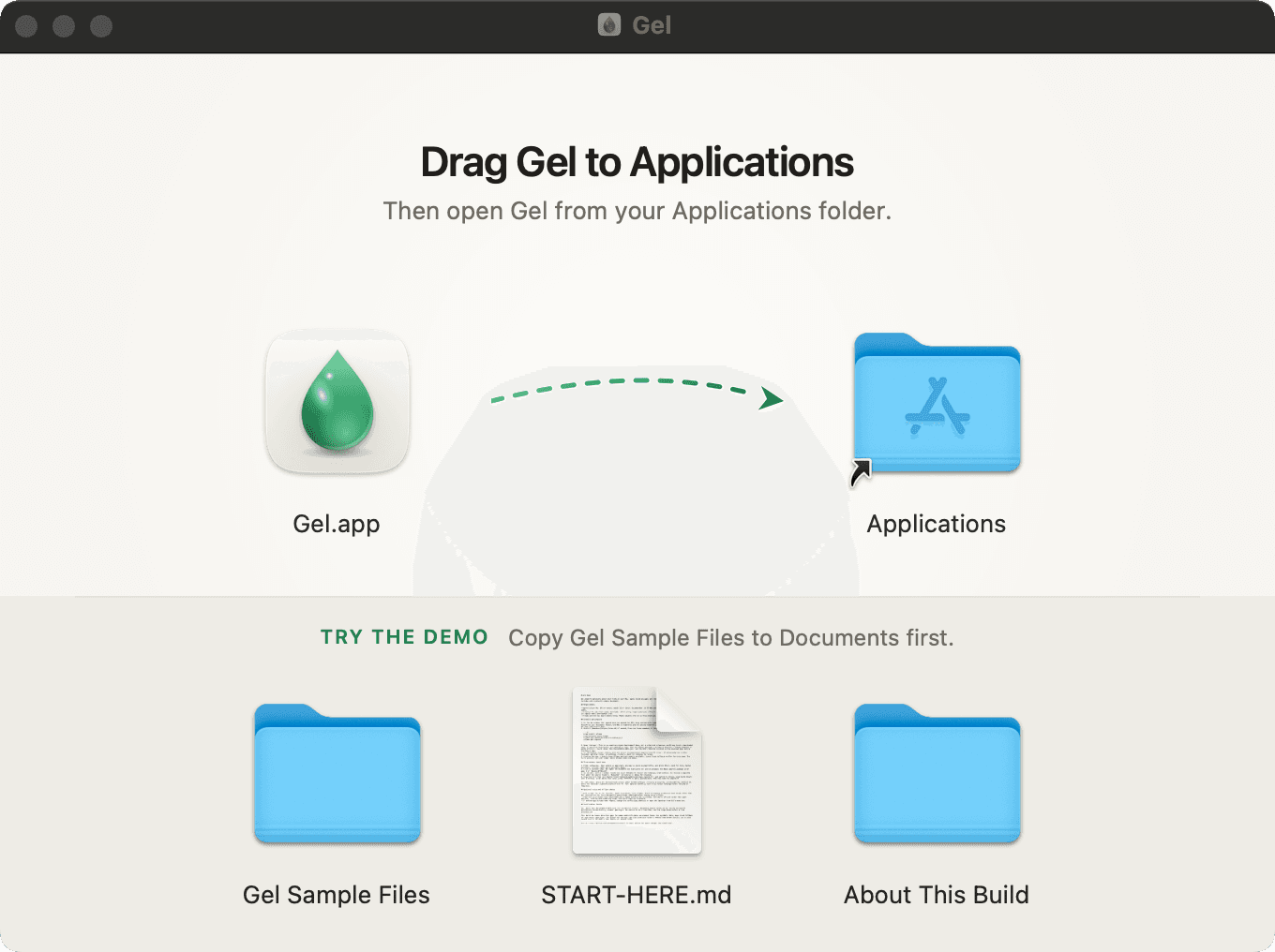
Drag Gel to Applications
Open the DMG and drag Gel onto Applications. Then drag Gel Sample Files to Documents: the disk image is read-only, and Gel writes redacted copies next to the originals. Eject the Gel disk when you're done.
- 3
Open it the first time
This is an ad-hoc-signed demo build, not a notarized release, so macOS stops it the first time. Open Gel once and dismiss the warning. Then go to System Settings → Privacy & Security, click Open Anyway under Security, and enter your password.
The button only appears for about an hour after you try to open the app. On macOS 15, Control-clicking and choosing Open no longer skips this step.
- 4
Install Ollama and the models
Gel runs its models through Ollama. The model weights aren't in the DMG.
# Needs Homebrew: https://brew.sh
brew install ollama
brew services start ollama
To try the sample files, open Gel, choose Work: HR, and select Documents/Gel Sample Files/HR Files. When indexing finishes, open the Library, select three résumés and click Redact 3 files.
To try questions, press ⌥Space and ask “Sino sa applicants ang may 5+ years sa payroll?”
Before you start
Requirements and questions.
Requirements
- Mac
- Apple silicon (M1 or newer)
- macOS
- 15 Sequoia or later
- Memory
- 16 GB recommended
- Disk
- About 8 GB free for the models and the index
- Also needs
- Ollama, installed in step 4
Intel Macs aren't supported.